
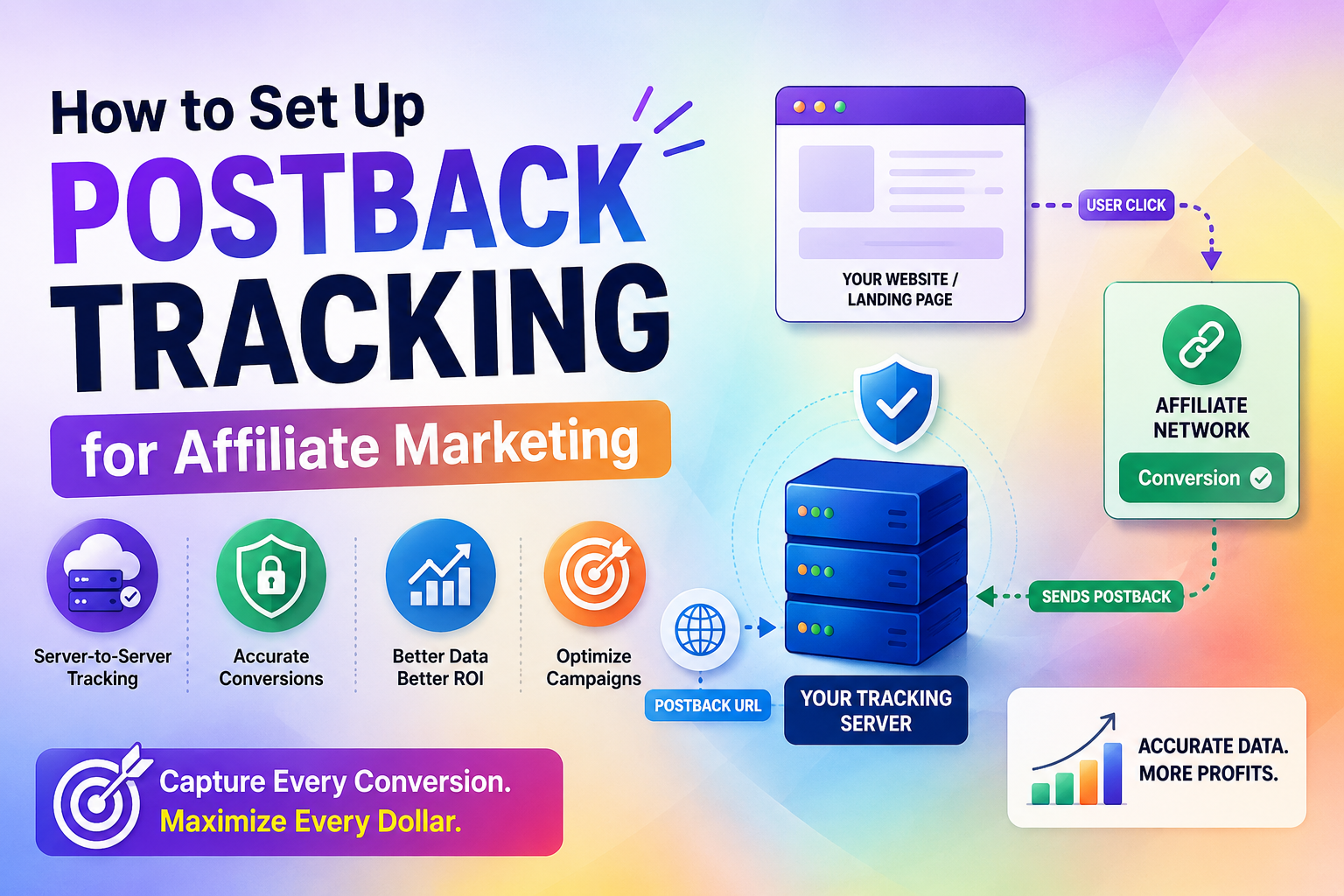
Did you know that nearly 40% of all affiliate conversions are currently lost due to browser-based privacy restrictions? As major browsers phase out third-party cookies, relying on traditional client-side methods is no longer a viable strategy for serious marketers.
To secure your revenue, you must shift toward server-side solutions. Implementing postback tracking allows you to send conversion data directly from your server to your affiliate network. This method ensures data integrity and bypasses the limitations imposed by modern privacy updates.
By adopting this professional approach, you gain a clearer view of your campaign performance. This guide will walk you through the essential steps to master this reliable postback tracking setup, providing you with the foundation needed to scale your business effectively in a privacy-focused digital landscape.
Key Takeaways
- Browser privacy updates have rendered traditional cookie-based methods increasingly unreliable for marketers.
- Server-side solutions provide a more accurate way to record conversions without relying on client-side data.
- Direct server communication ensures that your performance metrics remain consistent and secure.
- Moving to this advanced setup is essential for maintaining long-term data accuracy in affiliate campaigns.
- Professional implementation helps you optimize your marketing spend by capturing every valid lead.
Stop Losing Affiliate Conversions Today
Protect every commission with reliable server-side tracking. Start using postback tracking now and capture accurate data before privacy changes cost you more revenue.
What are the Fundamentals of Postback Tracking?
You might wonder how affiliate networks know exactly when a sale occurs on your site; the answer lies in a secure communication process. As you scale your campaigns, relying on outdated methods can lead to significant data loss. Mastering the mechanics of postback tracking is the most critical step toward optimizing your marketing budget and ensuring every conversion is counted.
What is postback tracking and why it matters
At its core, what is postback tracking? It is a server-to-server communication method that sends conversion data directly from an affiliate network to your tracking platform. Unlike traditional methods that rely on the user’s browser, this process happens entirely behind the scenes.
This approach is vital because it bypasses common issues like browser cookie restrictions and ad-blocking software. With postback tracking, advertisers can maintain accurate reporting even when traditional tracking methods fail. By using postback url tracking, you ensure that your data remains accurate and reliable. This level of precision allows you to make informed decisions about which traffic sources provide the highest return on investment.
How a postback URL functions in the affiliate ecosystem
To understand what is a postback url, think of it as a digital handshake between two servers. When a user clicks your affiliate link, your tracker assigns a unique identifier, often called a Click ID. This ID travels with the user through the affiliate network’s funnel.
When a conversion occurs, the affiliate network triggers the postback url by sending a request back to your server. This request includes the original Click ID, confirming that the specific user you sent has completed the desired action. This secure exchxns intact regardless of the user’s device or browser settings.
Comparing server-to-server tracking versus pixel-based methods
Choosing the right tracking method is essential for long-term success. While pixels have been the industry standard for years, they are increasingly vulnerable to privacy updates and browser limitations. The following table highlights the key differences between these two approaches.
| Feature | Pixel-Based Tracking | Server-to-Server (Postback) |
|---|---|---|
| Data Source | Browser/Client-side | Server/Network-side |
| Reliability | Low (Cookie blocked) | High (Secure handshake) |
| Privacy Impact | High (Easily restricted) | Low (Privacy compliant) |
| Setup Complexity | Simple | Moderate |
By moving toward postback url tracking, you gain a more robust infrastructure. A properly configured postback tracking system helps businesses create a scalable and privacy-friendly tracking environment. This transition protects your data integrity and provides a clearer picture of your campaign performance. Implementing this setup is a foundational move for any serious affiliate marketer.
Preparing Your Affiliate Marketing Infrastructure
Establishing a robust infrastructure is essential for accurate conversion tracking and long-term growth. Before you begin the technical setup, you must ensure your environment is capable of handling server-side requests. A solid foundation prevents data loss and ensures that every click is accounted for correctly.
Selecting a reliable affiliate tracking platform
Choosing the right software is the most critical decision you will make for your business. You need a platform that offers high uptime, fast redirect speeds, and comprehensive reporting features. Popular options like Voluum, RedTrack, and Bemob provide the necessary tools to manage your campaigns effectively.
When evaluating these platforms, look for those that offer native support for server-to-server communication. This feature is vital for maintaining high-quality conversion tracking across different traffic sources. A reliable tracker acts as the central hub for all your marketing data. Platforms that support postback tracking allow marketers to manage conversion data with greater accuracy and control.
| Platform | Server-Side Support | Ease of Use | Pricing Tier |
|---|---|---|---|
| Voluum | Excellent | High | Premium |
| RedTrack | Strong | Medium | Mid-Range |
| Bemob | Good | High | Budget |
Ensuring your website supports server-side communication
Your website hosting environment must be configured to allow outgoing and incoming server requests. Many shared hosting plans restrict these actions, which can break your conversion tracking flow. You should verify that your server allows scripts to execute background tasks without timing out.
Check your server logs regularly to ensure that communication between your landing page and the tracking platform remains active. A reliable postback tracking framework depends on continuous server communication, making regular monitoring essential for preventing lost conversion data.
If your server blocks specific IP addresses or ports, your data will not sync properly. Always consult with your hosting provider to confirm that your plan supports the necessary API calls.
Configuring your tracking domain for secure data transmission
Security is a non-negotiable aspect of modern digital marketing. You must use a custom tracking domain with a valid SSL certificate to ensure that all data is encrypted during transmission. This practice protects your sensitive information from being intercepted or flagged by browsers as insecure.
Using a secure domain also helps maintain trust with your visitors and improves your overall conversion tracking reliability. Most tracking platforms allow you to easily add your own domain via DNS settings. Once configured, ensure that your redirects are forced over HTTPS to maintain a secure connection at all times.
Defining Your Conversion Goals and Parameters
Establishing precise conversion goals is the foundation of any high-performing campaign. Without a clear strategy, you risk collecting vast amounts of data that lack actionable insights. Effective conversion tracking requires you to categorize and measure success based on specific user behaviors that align with your business objectives.
Identifying key performance indicators for your campaigns
Your first step involves selecting the right metrics to monitor. While raw clicks are useful, they rarely tell the full story of your campaign’s health. You should focus on metrics that directly impact your bottom line, such as lead quality, cost per acquisition, and total return on ad spend.
By prioritizing these indicators, you ensure that your postback url tracking setup remains focused on profitability. This clarity allows you to filter out noise and concentrate on the traffic sources that actually convert.
Mapping conversion events to specific postback triggers
Once you define your goals, you must map these events to specific triggers within your tracking system. A trigger acts as a signal that a desired action has occurred, such as a completed purchase or a form submission. You need to ensure that each unique event sends a distinct signal back to your server.
“Data is the compass that guides your marketing ship; without it, you are simply sailing in the dark.”
This mapping process is vital for maintaining organized data. When your system recognizes these triggers correctly, you can automate your optimization efforts with confidence. A properly structured postback tracking setup ensures every important conversion event is recorded and connected with the correct traffic source.
Structuring your sub-ID parameters for granular data analysis
To gain deep insights, you should implement a robust structure for your sub-ID parameters. These tags allow you to pass specific information about the traffic source, creative asset, or device type through your tracking links. By organizing these parameters, you can identify exactly which variables drive the highest quality conversions.
| Conversion Type | Primary Metric | Tracking Priority |
|---|---|---|
| Lead Generation | Form Submissions | High |
| E-commerce Sale | Revenue per Order | Critical |
| App Install | First Open Rate | Medium |
| Subscription | Churn Rate | High |
Using this structured approach to conversion tracking empowers you to prune underperforming assets quickly. It transforms your postback url tracking from a simple logging tool into a powerful engine for scaling your most successful campaigns.
The Technical Process of Postback Tracking Implementation
Setting up your tracking infrastructure involves several critical steps to bridge the gap between your traffic and your affiliate network. Successful postback tracking implementation depends on correctly passing identifiers and validating conversion signals. Achieving high-level postback tracking requires attention to detail and a clear understanding of how data moves across different platforms. By following a systematic approach, you ensure that every conversion is captured accurately.

Generating your unique postback URL within your tracker
Most modern tracking platforms provide a specific template to create your postback url. You must navigate to the campaign or offer settings within your chosen tracker to find the unique string generated for your account. This URL acts as the secure endpoint that receives conversion data from the affiliate network.
Ensure that you select the correct protocol, typically HTTPS, to maintain data security. Once generated, copy this link carefully, as any missing characters will break the communication chain between your systems.
Passing click IDs from your landing page to the affiliate network
The core of this process relies on the unique click ID generated when a visitor lands on your page. You must append this ID to your affiliate offer link using a dynamic parameter, such as {click_id}. This allows the affiliate network to store the ID and associate it with any future conversion event.
Without this postback url parameter, the network cannot report back to your tracker which specific user completed the action. Always verify that your landing page redirects correctly and preserves the click ID throughout the user journey.
Configuring the postback URL inside your affiliate network dashboard
The final step involves pasting your tracker’s link into the designated postback field within your affiliate network dashboard. This creates the necessary handshake that triggers a notification whenever a sale or lead occurs.
Proper postback tracking setup ensures that your dashboard reflects real-time performance data. A well-implemented postback tracking process creates a direct connection between your affiliate network and tracking platform, ensuring every conversion is recorded correctly.
| Parameter Type | Function | Example |
|---|---|---|
| Click ID | Unique user identifier | {click_id} |
| Payout | Monetary value of conversion | {payout} |
| Transaction ID | Unique sale reference | {txid} |
| Status | Conversion state | {status} |
Integrating Postback URLs with Affiliate Networks
Every affiliate network operates with unique protocols that demand careful configuration for your tracking setup. While the core concept remains consistent, the specific implementation steps vary significantly between platforms. Establishing a reliable postback url requires you to follow the documentation provided by your specific network partner.
Upgrade to Accurate Conversion Tracking
Build a privacy-proof tracking system that records every lead and sale. Choose a professional tracking plan and optimize campaigns with confidence today.
Navigating network-specific settings for server-to-server integration
Most modern affiliate networks provide a dedicated section for server-to-server tracking. You will typically find these settings under the “Tracking” or “Postback” tabs within your dashboard. It is vital to ensure that you select the correct protocol, usually HTTPS, to maintain secure data transmission.
Some networks require you to whitelist your server IP address before they allow incoming requests. Failure to complete this step often results in blocked communication, even if your configuration appears correct. Always verify these security requirements before attempting your first test.
Handling dynamic parameters and macros correctly
Macros act as placeholders that the network replaces with real data, such as transaction IDs or payout amounts. If you fail to use the correct syntax, your postback url tracking will fail to record essential conversion details. Each network uses a proprietary naming convention for these variables.
For example, one network might use {click_id} while another uses {subid}. You must map these macros precisely to the fields in your tracking software. Using the wrong macro will lead to empty data fields or mismatched conversion records.
| Network Type | Macro Format | Data Captured |
|---|---|---|
| Standard CPA | {click_id} | Unique Click Identifier |
| E-commerce | {order_value} | Total Sale Amount |
| Lead Gen | {lead_status} | Conversion Milestone |
Testing the handshake between your network and your tracker
Once you have configured your settings, you must perform a handshake test to verify the connection. This process involves triggering a test conversion to see if the data reaches your tracker in real-time. A successful postback url test confirms that your server is correctly listening for incoming signals.
If the test fails, check your server logs for 404 or 500 error codes. These logs provide specific clues about why the postback url tracking handshake was rejected. By systematically reviewing these errors, you can quickly resolve configuration gaps and ensure your data remains accurate.
Troubleshooting Common Postback Tracking Issues
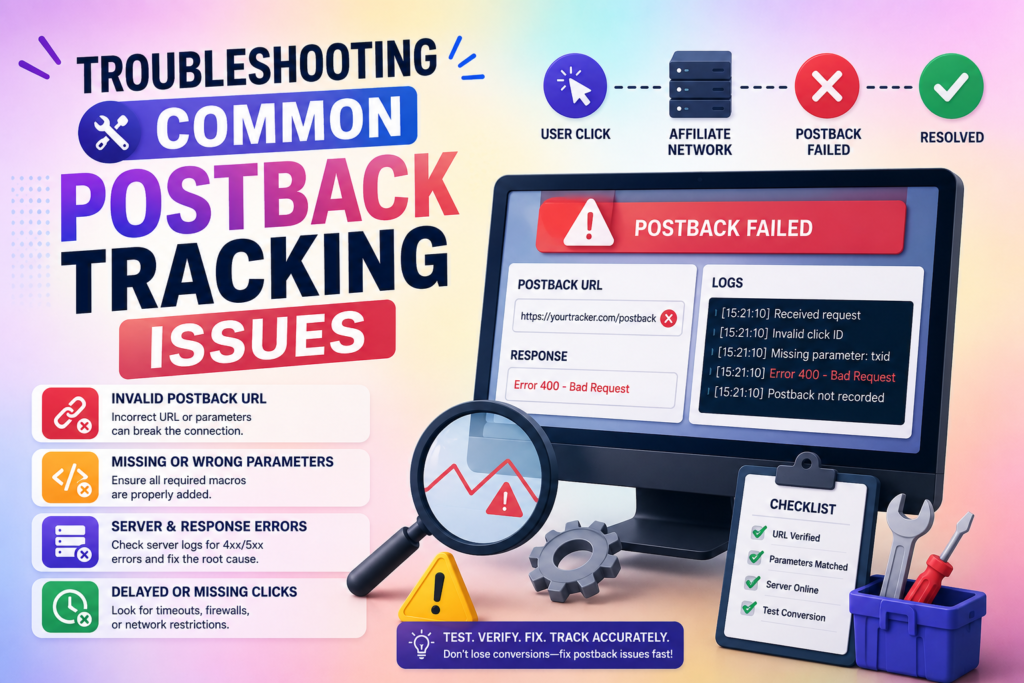
Even the most robust postback tracking systems can occasionally encounter technical hurdles that disrupt your data flow. When your conversion reports remain empty despite active traffic, you need a clear strategy to diagnose the issue quickly. A systematic approach ensures that your marketing data remains accurate and reliable for future decision-making.
Identifying why conversions are not firing in your dashboard
The most frequent cause for missing data is a failure in the handshake between your landing page and the affiliate network. You should first verify that your unique click ID is being captured correctly on your landing page. If the ID is not passed into the URL parameters, the network cannot attribute the conversion back to your specific traffic source.
Check your affiliate network dashboard to ensure the postback URL is formatted exactly as required. Even a minor typo in a macro or a missing character can break the entire chain. Double-check your parameters to confirm they match the specific requirements of your chosen network.
Debugging server logs to find communication errors
When you suspect a communication failure, your server logs are your most valuable resource. These logs record every request sent and received, allowing you to see exactly where the process stalls. Look for HTTP status codes that indicate a problem, such as 404 errors for broken paths or 500 errors for server-side issues.
If you see a 403 error, it often suggests that your server is blocking the incoming request from the network. You may need to whitelist the network’s IP address to allow postback tracking signals to pass through your firewall. Reviewing these logs regularly helps you catch errors before they impact your campaign reporting.
Resolving discrepancies between network data and your tracker
Discrepancies often arise due to time zone differences or latency in data reporting. Compare the timestamps of conversions in your affiliate network against the logs in your tracking platform to identify patterns. If the data gap is consistent, you might simply need to adjust your reporting window settings.
In cases where data is missing entirely, ensure that your postback tracking setup is not being blocked by browser privacy settings or ad blockers. Sometimes, server-to-server communication is the only way to bypass these client-side restrictions. Maintaining a clean, well-documented setup will help you resolve these conflicts with minimal downtime.
Advanced Strategies for Optimizing Your Tracking Setup
Elevating your tracking strategy requires a shift toward more granular and automated data management. Once your foundational setup is stable, you can begin refining your approach with advanced tactics to gain a competitive edge. Effective postback url tracking serves as the backbone for these sophisticated optimizations.
Implementing event-based postbacks for multi-step funnels
Complex marketing funnels often involve multiple conversion points, such as email sign-ups, trial starts, and final purchases. You should configure unique triggers for each of these milestones to gain a complete view of the user journey. This granular data allows you to identify exactly where users drop off in your funnel.
By assigning specific values to each event, you can better understand the lifetime value of your leads. This method ensures that your postback url tracking remains accurate even when a customer takes several days to complete a purchase.
Using postback data to automate campaign bidding
Feeding your conversion data directly into automated bidding systems can significantly improve your return on investment. Modern ad platforms use this information to optimize your bids in real-time based on actual performance. You no longer need to manually adjust bids for every single keyword or placement.
When your system receives a signal that a high-value conversion occurred, it can automatically increase your bid for similar traffic. This automated scaling helps you capture more profitable leads while reducing spend on underperforming segments.
Leveraging API integrations for real-time data synchronization
API integrations take your data management to the next level by removing the need for manual file uploads. Real-time synchronization ensures that your dashboard always reflects the most current campaign performance. This speed is critical when you are managing large budgets across multiple affiliate networks.
| Feature | Basic Tracking | Advanced Integration |
|---|---|---|
| Data Latency | Delayed (Hours) | Real-time |
| Funnel Depth | Single Action | Multi-step |
| Bidding Control | Manual | Automated |
| System Sync | Manual Export | API-driven |
By utilizing these advanced methods, you transform your tracking from a simple reporting tool into a powerful engine for growth. Consistent monitoring of your postback url tracking setup ensures that your automated systems always have access to clean, actionable data.
Ensuring Data Privacy and Compliance
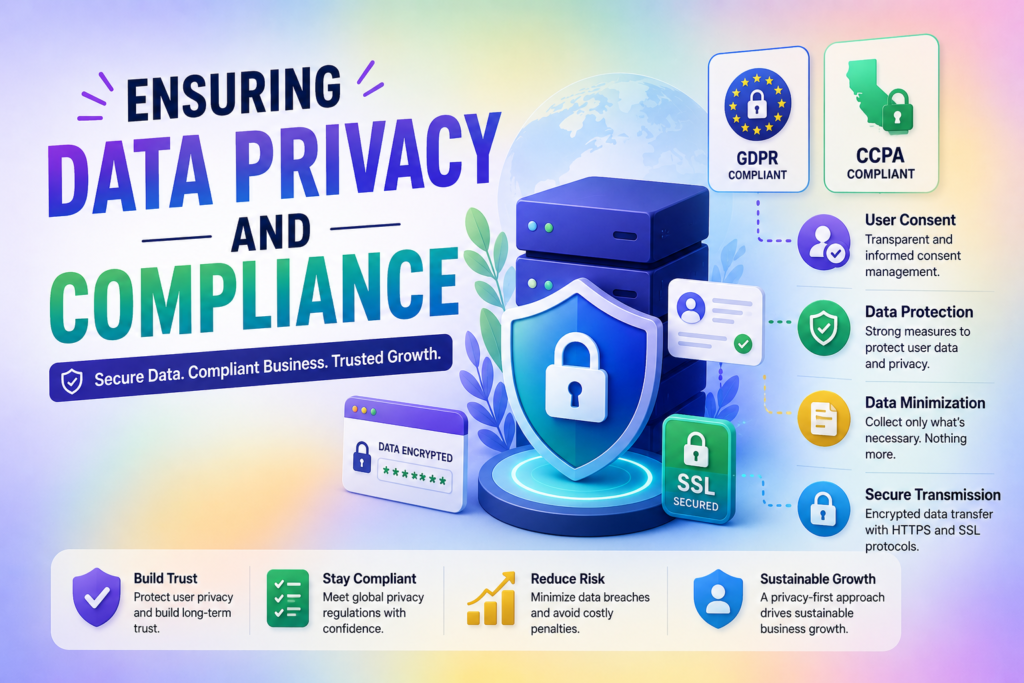
Compliance with international data laws is no longer optional for those using a postback url. As digital regulations evolve, you must prioritize the protection of user information to maintain trust and avoid legal penalties. Balancing effective data collection with strict privacy standards is the hallmark of a professional affiliate marketer.
Managing user consent and tracking transparency
Transparency is the foundation of modern data ethics. You should always provide clear information to your visitors regarding what data is collected and how it is utilized. Implementing a robust consent management platform helps you track user preferences effectively.
Ensure that your privacy policy is easily accessible on your landing pages. By being open about your tracking methods, you build credibility with your audience. This proactive approach reduces bounce rates and fosters a more positive user experience.
Adhering to GDPR and CCPA requirements in your tracking setup
The General Data Protection Regulation (GDPR) and the California Consumer Privacy Act (CCPA) mandate strict control over personal data. You must ensure that your tracking setup allows for the deletion or anonymization of user data upon request. Data minimization is a key strategy here; only collect the information that is strictly necessary for your conversion attribution.
Regularly audit your data flow to ensure that no sensitive personal information is inadvertently passed through your tracking links. By keeping your data practices lean, you simplify your compliance efforts significantly. Always consult with legal professionals to ensure your specific setup meets regional requirements.
Securing your postback URLs against unauthorized access
A postback url can become a target for malicious actors if left unprotected. You should implement IP whitelisting to ensure that only trusted servers can communicate with your tracking platform. This simple step prevents unauthorized parties from injecting fake conversion data into your reports.
Furthermore, utilize encrypted connections to protect the integrity of your data transmission. Regularly rotate your security tokens and monitor your server logs for any suspicious activity. These measures ensure that your business intelligence remains accurate and secure.
| Compliance Measure | Primary Benefit | Implementation Level |
|---|---|---|
| IP Whitelisting | Prevents unauthorized postback url access | High |
| Consent Banners | Ensures user transparency | Medium |
| Data Anonymization | Meets GDPR/CCPA standards | High |
| SSL Encryption | Secures data in transit | Essential |
Analyzing Your Data for Better ROI
Transforming raw numbers into actionable insights is the secret to maximizing your profit margins. Accurate postback tracking gives marketers the confidence to optimize campaigns using real conversion data instead of assumptions. By leveraging precise conversion tracking, you move beyond guesswork and start making decisions based on actual performance metrics. This approach ensures that every dollar spent on your marketing efforts works toward your bottom line.
Interpreting conversion reports to identify high-performing traffic
Your dashboard provides a wealth of information regarding where your visitors originate. You should look for patterns in geographic location, device type, and referral sources that correlate with high conversion rates. Identifying these trends allows you to focus your budget on the segments that provide the highest return on investment.
Consistent conversion tracking helps you spot anomalies in your traffic quality. If a specific publisher or ad placement consistently delivers high-intent users, you can prioritize those channels. Conversely, you will quickly notice when traffic quality dips, allowing you to pivot before wasting your budget.
Using postback data to prune underperforming affiliate offers
Not every offer will resonate with your audience, and that is perfectly normal. You must use your data to identify which campaigns are failing to meet your minimum profit thresholds. By cutting these underperforming offers, you free up capital to reinvest in more profitable ventures.
Data-driven pruning is essential for maintaining a healthy portfolio. If an offer shows a high click-through rate but zero conversions, it may indicate a disconnect between your landing page and the offer itself. Regularly auditing these metrics prevents you from bleeding money on campaigns that simply do not convert.
Scaling successful campaigns based on accurate conversion attribution
Once you identify a winning campaign, the next step is to scale your efforts safely. Accurate attribution allows you to see exactly which touchpoints lead to a sale, giving you the confidence to increase your bids.
With effective postback tracking, marketers can scale campaigns more confidently by relying on verified conversion data instead of estimated results. You can then expand your reach to similar audiences or increase your daily budget on top-performing platforms.
Scaling requires a steady hand and constant monitoring of your conversion tracking setup. As you increase volume, ensure that your infrastructure can handle the influx of data without losing accuracy. This systematic approach turns your affiliate business into a predictable, revenue-generating machine.
| Metric | Low Performance | High Performance | Action Required |
|---|---|---|---|
| Conversion Rate | Below 1% | Above 3% | Optimize or Pause |
| Cost Per Acquisition | Higher than Payout | Lower than Payout | Scale Budget |
| Traffic Quality | High Bounce Rate | High Engagement | Refine Targeting |
Best Practices for Maintaining Tracking Accuracy
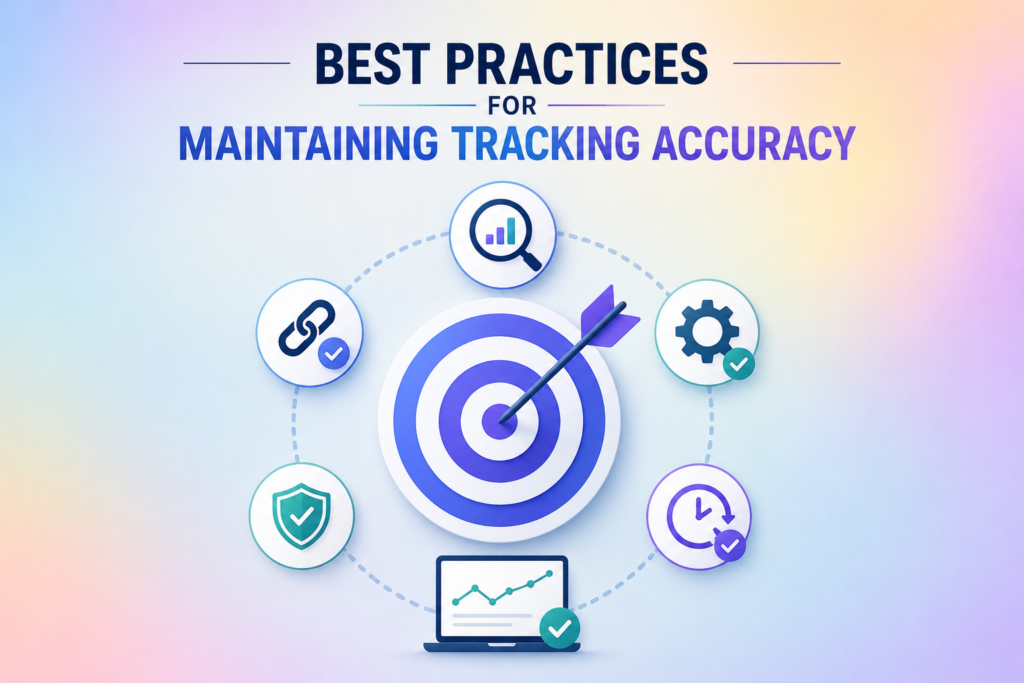
Achieving long-term success in affiliate marketing depends heavily on the health of your data pipelines. You must treat your infrastructure as a living system that demands constant attention to ensure your conversion tracking remains reliable. Neglecting these systems often leads to data gaps that can cost you significant revenue over time.
Performing regular audits of your tracking links
You should schedule routine audits to verify that every link in your funnel is firing correctly. Even minor changes to your landing page or website structure can break the handshake between your site and the affiliate network.
A proactive approach allows you to catch errors before they impact your bottom line. Regular reviews of your postback tracking configuration help identify broken parameters, missing data, and potential tracking issues before they affect campaign performance.
During these audits, check that your postback tracking parameters are passing the correct values. Ensure that your sub-IDs are populating accurately in your dashboard. If you notice a sudden drop in reported conversions, a manual test of your own tracking links is the fastest way to isolate the issue.
Updating your tracking setup when switching affiliate networks
Every affiliate network handles data transmission differently. When you decide to work with a new partner, you must reconfigure your conversion tracking to match their specific requirements. Maintaining consistent postback tracking configurations during these transitions helps protect attribution accuracy and prevents gaps in campaign reporting. Failing to update your macros or postback URLs will result in lost data and inaccurate attribution.
Always review the technical documentation provided by the new network before you launch your first campaign. Verify that your server-side communication is configured to accept their unique dynamic parameters. This transition period is critical for maintaining the integrity of your postback tracking data.
Keeping your tracking software updated for security and performance
Your tracking platform is the backbone of your business, so keeping it updated is essential. Software developers frequently release patches that fix security vulnerabilities and improve the speed of data processing. Running outdated software puts your sensitive campaign data at risk of unauthorized access.
Regular updates also ensure compatibility with modern browser privacy standards. By staying current, you maintain the highest level of postback tracking precision even as the digital landscape evolves. Use the following table to organize your maintenance schedule.
| Task Category | Frequency | Primary Goal | Action Required |
|---|---|---|---|
| Link Audit | Weekly | Data Integrity | Test click-to-conversion flow |
| Network Sync | Per Campaign | Parameter Match | Update macros and URLs |
| Software Patch | Monthly | Security | Install latest version updates |
| Data Review | Daily | Performance | Check for conversion gaps |
Scale Your Affiliate Business with Confidence
Unlock precise attribution and maximize ROI with advanced postback tracking tools. Purchase your tracking plan today and make every conversion count.
Conclusion
Precision in your tracking setup serves as the foundation for every profitable campaign you launch. You now possess the technical knowledge to move beyond basic metrics and embrace server-to-server accuracy.
Reliable data empowers you to make informed decisions that drive growth. Platforms like Voluum or RedTrack become far more powerful when your postback configuration remains stable and secure.
Your commitment to maintaining a compliant and transparent infrastructure protects your reputation with affiliate networks. By continuing to improve your postback tracking setup, you can preserve attribution accuracy and scale campaigns with confidence. Consistent audits ensure your conversion attribution stays sharp as your business scales.
Take these insights and apply them to your current marketing efforts today. Review your tracking links and verify your handshake protocols to ensure no revenue slips through the cracks. Your path to long-term success relies on the quality of the data you collect.
FAQs
What is postback tracking and why should I use it over pixels?
Postback tracking, also known as server-to-server (S2S) tracking, is a method of recording conversions where data is passed directly between the affiliate network’s server and your tracking platform. Unlike traditional pixel-based methods that rely on browser cookies, postback tracking is more reliable in a privacy-focused era. By moving your conversion tracking to the server side, you avoid data loss caused by ad-blockers, browser clearing, and Apple’s Intelligent Tracking Prevention (ITP).
What is a postback URL and how does it function?
A postback URL is a dedicated link generated by your tracking software—such as Voluum or RedTrack—that acts as a secure handshake. When a user completes a conversion on the advertiser’s site, the affiliate network (like Everflow or ClickBank) “pings” this URL. This signal tells your tracker that a specific click ID has resulted in a sale or lead, allowing for real-time attribution without needing the user’s browser to remain open.
How do I generate and configure my unique postback URL?
To begin postback url tracking, you first navigate to your tracking platform to generate a unique global or offer-specific URL. You then take this link and paste it into the “Postback” or “S2S Integration” section of your affiliate network’s dashboard. Crucially, you must ensure the URL contains the correct macros and dynamic parameters so the network can send back the unique click ID associated with the conversion.
Why are my conversions not appearing in my dashboard even though the setup is complete?
If your conversion tracking isn’t firing, it is often due to a mismatch in parameters. You should audit your setup to ensure the click ID is being passed correctly from your landing page to the affiliate network. You can also debug the connection by checking your server logs to see if the network is attempting to ping your postback URL and if your server is returning an error code (like a 404 or 500).
Can I use postback tracking for multi-step funnels and upsells?
Yes, you can implement event-based postbacks to track different stages of a customer journey. By setting up multiple postback URLs or using specific event parameters, you can distinguish between a “lead,” an “initial purchase,” and an “upsell.” This granular data is essential for optimizing your return on investment (ROI) and pruning underperforming offers from your campaigns.
Is server-to-server tracking compliant with global privacy laws like GDPR and CCPA?
Server-side postback tracking is generally considered more secure and privacy-compliant than client-side cookies because it limits the exposure of user data in the browser. However, you must still ensure that you are transparent about your tracking methods in your privacy policy and that you handle user consent appropriately, particularly when synchronizing data with platforms like Google Ads or Meta.
How do I perform a “handshake test” to verify my tracking?
Most professional networks, such as MaxBounty or Impact, allow you to perform a test conversion. You click your own tracking link to generate a real click ID, then manually fire the postback URL using that ID or complete a test offer. If the conversion appears in both your network dashboard and your tracker, the handshake is successful and your postback url tracking is fully operational.
What are the best practices for maintaining tracking accuracy over time?
You should perform regular audits of your tracking infrastructure. This includes verifying that your tracking domain remains secure (HTTPS), updating your software to the latest version for performance, and re-testing your links whenever you or the affiliate network make changes to the offer structure. Consistent maintenance ensures your data remains the “single source of truth” for scaling your business.
Can I use postback tracking with multiple affiliate networks at the same time?
Yes, most modern tracking platforms like Linkstrackly, RedTrack, and more support multiple affiliate networks simultaneously. You can create separate campaigns and unique postback URLs for each network while managing all your conversion data from a single dashboard. This centralized approach makes it easier to compare performance across different traffic sources and optimize your marketing budget more effectively.
Do I need coding knowledge to set up postback tracking?
No, you do not need advanced programming skills to implement postback tracking. Most affiliate networks and tracking platforms provide step-by-step documentation, pre-built templates, and dynamic macros that simplify the setup process. However, having a basic understanding of URLs, parameters, and server-side tracking concepts can help you troubleshoot issues and configure your campaigns more efficiently.
1 thought on “How to Set Up Postback Tracking for Affiliate Marketing”