

Have you ever wondered exactly which link brought a visitor to your website, or are you simply guessing where your traffic originates? In the fast-paced world of digital marketing, precision is everything. If you cannot identify your most successful channels, you are essentially flying blind while spending your hard-earned budget.
Learning how to measure campaign performance effectively is the first step toward making smarter, data-driven decisions. By utilizing standardized tracking tags, you gain clear visibility into your audience’s behavior. This process allows you to refine your strategy and boost your overall campaign performance significantly.
Implementing simple utm parameters provides the granular data you need to optimize your outreach. When you understand exactly what works, you can stop wasting time on tactics that fail to deliver results. Let’s explore how to master these tools to gain a competitive edge in your industry.
Key Takeaways
- Tracking traffic sources is essential for accurate marketing analysis.
- Data-driven decisions lead to higher conversion rates and better ROI.
- Standardized tagging helps you identify your most effective channels.
- Proper implementation eliminates guesswork from your digital strategy.
- Consistent monitoring allows for real-time adjustments to your campaigns.
Stop Guessing Where Your Traffic Comes From
Discover exactly which marketing channels drive clicks, leads, and sales. Build a data-driven strategy with accurate campaign tracking and actionable analytics insights.
What are the Fundamentals of UTM Parameters?
Mastering your digital marketing data begins with a clear understanding of how traffic reaches your website. Without a reliable way to categorize incoming visitors, you are essentially flying blind when it comes to evaluating your marketing spend.
Accurate data collected through UTM parameters is the lifeblood of any successful digital strategy. By implementing a standardized system, you ensure that every click is accounted for and attributed to the correct source.
What Are UTM Tags and Why Do They Matter?
UTM tags, also known as UTM parameters, are small snippets of text added to the end of a URL. These parameters allow your analytics software to identify the specific campaign, source, and medium that drove a user to your landing page.
When a user clicks a link containing these tags, the information is passed to your analytics platform. This process transforms raw, anonymous traffic into actionable insights that reveal exactly which efforts are performing well.
“Without data, you’re just another person with an opinion.”
The following table illustrates the difference between standard links and those enhanced with tracking parameters:
| Link Type | Visibility | Data Granularity |
|---|---|---|
| Standard URL | Low | Basic Referral Only |
| Tagged URL | High | Campaign, Source, Medium |
| Customized URL | Very High | Full Journey Attribution |
The Role of UTM Tracking in Digital Marketing
The primary purpose of utm tracking is to provide clarity in a crowded digital landscape. By using these parameters, you can distinguish between traffic from a paid social ad, an organic email newsletter, or a guest blog post.
Maintaining a clean data environment when using UTM parameters is critical for long-term success. When you consistently apply these tags, you prevent your analytics reports from becoming cluttered with “direct” or “unknown” traffic sources.
Ultimately, this level of precision empowers you to allocate your budget toward the channels that provide the highest return. Consistency in your tagging strategy is the key to unlocking deeper performance analysis.
The Anatomy of a UTM Tag
Decoding the structure of a tracking link is the first step toward gaining total visibility into your traffic sources. By appending specific utm parameters to your destination URLs, you create a clear trail that your analytics software can follow with precision.
Breaking Down the Five Standard UTM Parameters
A complete tracking URL with UTM parameters consists of several distinct pieces of information. These tags work together to provide a comprehensive view of how users arrive at your site.
Source, Medium, and Campaign Name
The first three tags are essential for any effective campaign. The utm_source identifies the origin of your traffic, such as a specific newsletter or a social media platform. The utm_medium describes the general category of the link, like “email” or “cpc.” Finally, the utm_campaign allows you to label the specific marketing initiative, such as a “summer_sale” or “product_launch.”
Term and Content Parameters
Beyond the basics, you can use additional tags for more granular data. The utm_term is primarily used for tracking specific keywords in paid search campaigns. Meanwhile, the utm_content helps you differentiate between various ad variations, such as testing two different button colors or image styles in the same advertisement.
How UTM Parameters Interact with Your Website Analytics
Once a user clicks a link containing these tags, your analytics platform captures the data and stores it within your reports. This process of utm tracking ensures that every visit is correctly attributed to the right source and effort. Consistency is vital here, as your analytics dashboard will treat variations in spelling or capitalization as entirely different traffic sources.
By maintaining a clean and organized UTM parameters structure, you ensure that your data remains actionable. When your tags are applied correctly, you can easily filter your traffic to see exactly which strategies drive the most engagement and conversions for your business.
Best Practices for Naming Conventions
You can transform your messy marketing data into actionable insights by adopting a strict naming strategy. When every team member uses their own terminology, your analytics platform becomes cluttered with fragmented data that is nearly impossible to interpret. Standardization is the key to maintaining clean, reliable reports that actually inform your business decisions.
Maintaining Consistency Across Your Marketing Team
Collaboration often leads to confusion if you do not have a shared set of rules. If one person labels a source as “social” while another uses “social-media,” your reporting tools will treat these as two distinct channels. This discrepancy hides the true impact of your efforts.
To prevent this, you should implement a centralized documentation system. Consider these steps to keep your team aligned:
- Create a shared spreadsheet or database that acts as the single source of truth for all campaign tags.
- Establish a clear approval process for new campaign names before they go live.
- Conduct regular training sessions to ensure everyone understands the importance of following the established taxonomy.
Case Sensitivity and Special Character Considerations
Many marketers overlook the fact that most analytics platforms treat “Email” and “email” as two separate entities. This technical nuance can split your traffic data, making it appear as though your campaign is underperforming. Always default to lowercase letters to ensure your data remains unified and easy to aggregate.
“Data integrity is not just a technical requirement; it is the bedrock of every successful marketing strategy. If you cannot trust your numbers, you cannot optimize your results.”
Furthermore, you should avoid using special characters or spaces in your UTM parameters. Spaces are often converted into “%20” in URLs, which makes them difficult to read and prone to errors. Stick to alphanumeric characters and hyphens to keep your links clean and functional across all browsers.
Creating a Scalable UTM Taxonomy
A scalable taxonomy grows alongside your business, allowing you to track increasingly complex campaigns without losing clarity. You should design a structure that is flexible enough to accommodate new channels while remaining rigid enough to provide consistent reporting. Start by defining a hierarchy that covers your primary dimensions, such as source, medium, and campaign name.
By building a modular system, you ensure that your tracking remains effective even as your marketing efforts expand. Consistency today prevents headaches tomorrow, allowing you to focus on analyzing performance rather than cleaning up broken data sets.
How to Use UTM Parameters to Measure Campaign Performance
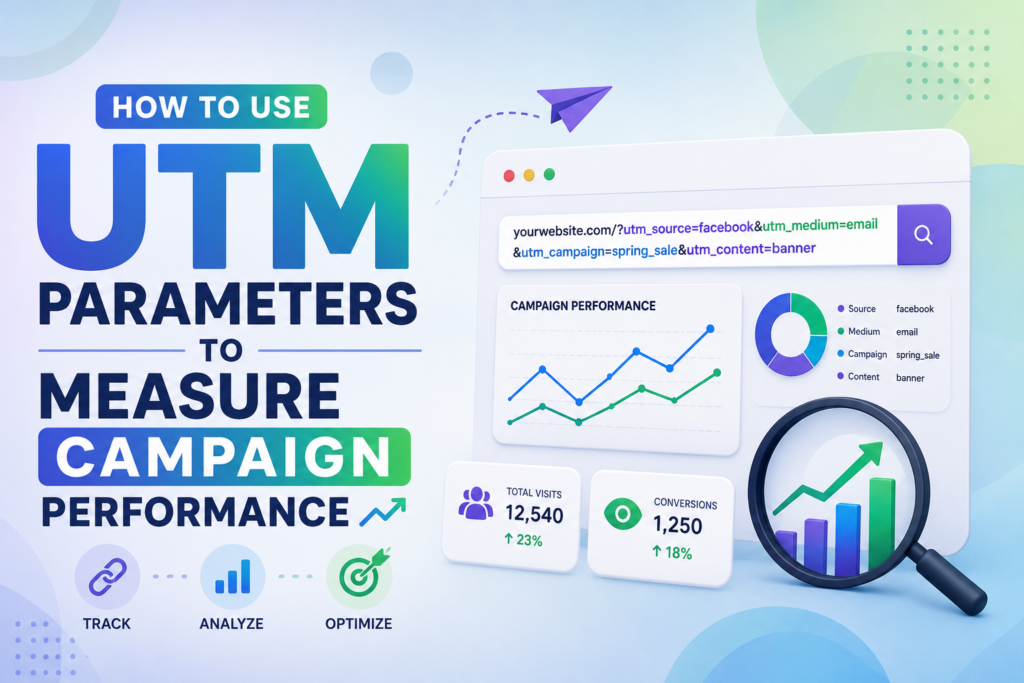
You can transform your marketing data by applying consistent utm parameters across every digital touchpoint. When you standardize your approach, you gain the ability to measure campaign performance with absolute clarity. This level of precision allows you to see exactly which efforts drive the most value for your business.
Step-by-Step Implementation for Social Media Campaigns
Social media platforms often obscure referral data, making it difficult to track organic or paid traffic. By appending tags to your links, you can distinguish between different posts, stories, or profile bios. Campaign tracking becomes much simpler when you define your source and medium clearly for every platform.
- Use the platform name as the source (e.g., facebook, linkedin).
- Define the medium as social to group all organic efforts.
- Create unique campaign names for specific seasonal promotions or product launches.
Tracking Email Marketing Effectiveness with UTMs
Email newsletters are powerful tools, but they often lack granular data without proper tagging. You should apply tags to every link within your email, including buttons, text links, and images. This ensures you can measure campaign performance by identifying which specific content resonates most with your subscribers.
Consider using the campaign parameter to identify the specific newsletter edition or subject line. This practice helps you compare the campaign performance of different email templates over time. By analyzing these metrics, you can refine your messaging to increase click-through rates significantly.
Monitoring Paid Search and Display Advertising
Paid advertising requires rigorous campaign tracking to ensure your budget is spent efficiently. You should use specific tags to differentiate between ad sets, keywords, and creative variations. This granular data allows you to optimize your spend by shifting resources toward the highest-performing ads.
When you monitor your utm parameters in your analytics dashboard, look for patterns in user behavior. You might discover that certain display banners drive more conversions than others, even if the click volume is lower. Consistent tagging is the foundation of a data-driven strategy that maximizes your return on investment.
Tools for Generating and Managing UTM Links
Building accurate utm tags is much easier when you have the correct technology at your fingertips. As your marketing efforts grow, manual entry becomes prone to errors and inconsistency. Utilizing dedicated tools ensures that your data remains clean and actionable across every campaign.
Turn Campaign Data Into More Conversions
UTM tracking is only the beginning. Learn how to connect campaign data with user behavior, conversion paths, and ROI metrics to optimize every marketing dollar you spend.
Using the Google Campaign URL Builder
The Google Campaign URL Builder is the most accessible starting point for most marketers. This free web-based tool allows you to input your website URL and specific parameters to generate a clean, trackable link instantly. It is highly recommended for beginners who need to create individual links for social media posts or specific advertisements.
By simply filling in the required fields, you ensure that your utm tags follow the standard format required by analytics platforms. This tool removes the guesswork from the process, providing a reliable way to verify your syntax before you publish your content.
Leveraging Spreadsheet Templates for Bulk Creation
When you manage multiple campaigns simultaneously, individual link generation becomes inefficient. Many professionals rely on custom spreadsheet templates to handle bulk creation. These files often use formulas to concatenate your parameters, allowing you to generate dozens of unique utm tags in seconds.
Consistency is the primary advantage of using a centralized spreadsheet. By locking in your naming conventions within the document, you prevent team members from using variations that could break your data reporting. This method is essential for maintaining a scalable and organized tracking strategy.
Automating UTM Tagging with Marketing Automation Platforms
For large-scale operations, manual link building is often replaced by sophisticated marketing automation platforms. Tools like HubSpot, Marketo, or Salesforce allow you to append tracking parameters automatically to every link sent through your email or social channels. This eliminates human error and ensures that every touchpoint is captured without extra effort.
These platforms often provide built-in dashboards that integrate your utm tags directly into your performance reports. By automating the process, you free up your team to focus on strategy rather than administrative tasks. This level of integration is vital for achieving a comprehensive view of your multi-channel marketing performance.
Integrating UTM Data with Google Analytics 4
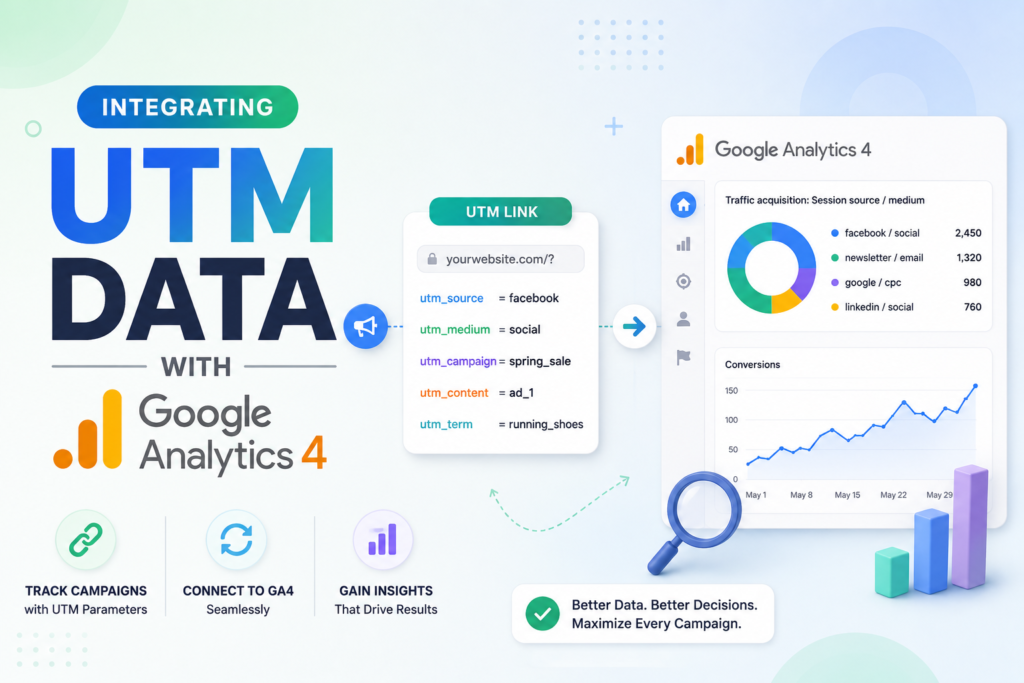
Mastering the Google Analytics 4 interface is essential for turning raw traffic data into actionable marketing insights. By correctly implementing utm parameters, you ensure that every click is accounted for within your analytics dashboard. This process allows you to bridge the gap between your external marketing efforts and on-site user behavior.
Locating Your Campaign Data in GA4 Reports
To view your campaign performance, navigate to the “Reports” section in the left-hand menu. Select “Acquisition” and then click on “Traffic acquisition” to see a breakdown of your incoming traffic sources.
You will find your campaign data listed under the “Session campaign” dimension. If you do not see this column, click the plus icon to add it as a secondary dimension to your report.
This view provides a high-level summary of how your utm parameters are performing across different channels. It is the fastest way to identify which specific initiatives are driving the most sessions and conversions.
Creating Custom Explorations for Deep-Dive Analysis
Standard reports are helpful, but sometimes you need a more granular view of your data. The “Explore” tab in GA4 allows you to build custom reports tailored to your specific business questions.
You can create a “Free form” exploration to compare multiple dimensions side-by-side. For example, you might want to analyze how different utm parameters correlate with specific user engagement metrics like average engagement time or event count.
- Select your dimensions: Add “Session campaign,” “Session source,” and “Session medium.”
- Choose your metrics: Include “Sessions,” “Conversions,” and “Total revenue.”
- Visualize the data: Use the drag-and-drop interface to build a table that highlights your top-performing campaigns.
Filtering and Segmenting Traffic by UTM Parameters
Filtering is a powerful way to isolate the performance of a single campaign or a group of related marketing activities. You can apply filters directly within your reports to remove noise and focus on the data that matters most to your team.
To apply a filter, look for the “Add filter” button at the top of your report view. You can set conditions based on your utm parameters, such as including only traffic where the campaign name contains a specific keyword or identifier.
Consistency is key when applying these filters and managing UTM parameters. If your naming conventions are clean, you can easily segment your audience to see how different demographics interact with your tracked links. This level of precision ensures that you can extract meaningful insights from your raw data without getting overwhelmed by irrelevant information.
Common Mistakes to Avoid in Campaign Tracking
Your campaign tracking efforts are only as effective as the discipline you apply to your tagging process. Even minor oversights can lead to fragmented data, making it difficult to determine which initiatives actually drive conversions. By identifying these common pitfalls early, you can protect the integrity of your marketing analytics.
Over-Tagging Internal Links and Navigation
One of the most frequent errors is applying utm tags to links within your own website. When you tag internal navigation, you inadvertently overwrite the original referral source that brought the user to your site.
This action creates a false session, which resets the attribution data for that visitor. To maintain accurate reporting, reserve these parameters exclusively for external traffic sources like social media, email newsletters, or paid advertisements.
Using Inconsistent Naming Conventions
Data fragmentation often stems from a lack of standardization across your team. If one person uses “email_newsletter” while another uses “email-newsletter,” your analytics platform will treat these as two distinct sources.
Because systems are case-sensitive, even a simple capitalization difference can skew your results. Consider these common issues that disrupt utm tracking:
- Mixing uppercase and lowercase letters.
- Using inconsistent spacing or special characters.
- Applying different naming structures for the same platform.
Failing to Document Your UTM Strategy
Without a centralized documentation strategy, your team will inevitably drift toward individual preferences. A shared document or a standardized spreadsheet is essential to ensure everyone follows the same protocol for campaign tracking.
Your documentation should clearly define the naming hierarchy for every channel and all UTM parameters. When you establish a clear, repeatable process, you eliminate guesswork and ensure that your utm tags remain clean and actionable over time. Consistent utm tracking is the foundation of reliable, data-driven decision-making.
Advanced Strategies for Multi-Channel Attribution
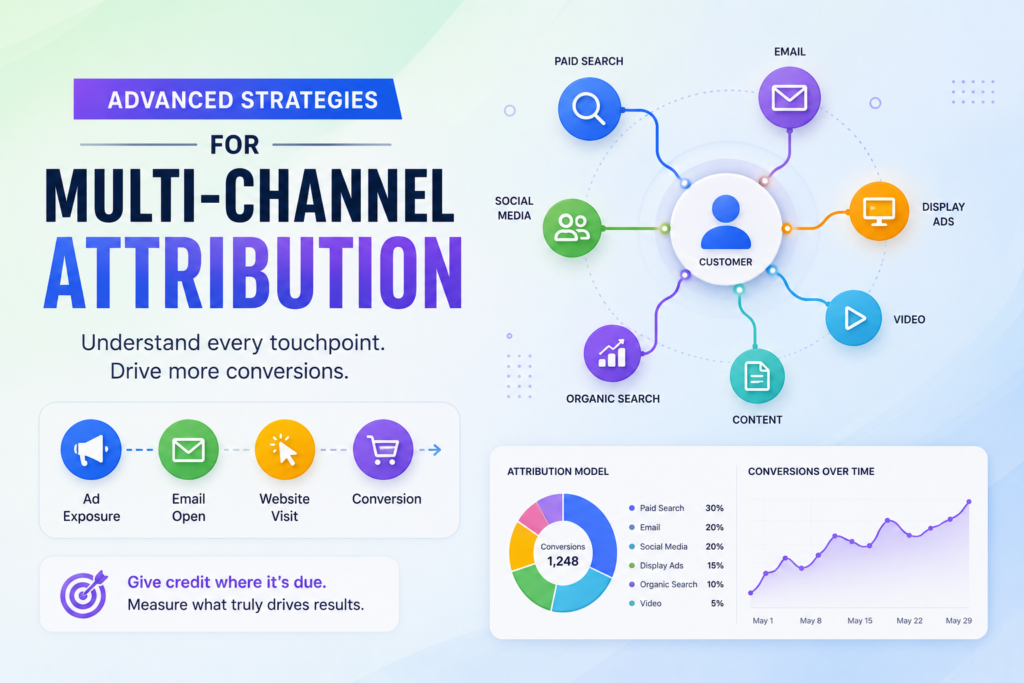
To truly master your data, you must connect individual clicks to long-term business outcomes. While basic metrics provide a snapshot of activity, advanced attribution reveals the hidden story behind every conversion. By looking at the entire path, you can better measure campaign performance across your entire digital footprint.
Mapping the Customer Journey Across Multiple Touchpoints
Modern buyers rarely convert after a single interaction. They often engage with social media ads, email newsletters, and organic search results before making a final purchase. Using consistent UTM parameters allows you to stitch these disparate interactions into a cohesive timeline.
By assigning unique tags to every touchpoint, you gain visibility into which channels act as assistants versus those that act as closers. This level of campaign tracking is vital for understanding the true value of your top-of-funnel awareness efforts.
“Data is the bridge between your marketing spend and your actual business growth; without it, you are simply guessing.”
Aligning UTM Data with CRM Systems
The real power of your data emerges when you push UTM parameters into your Customer Relationship Management (CRM) system. When a lead fills out a form, your CRM should capture the hidden UTM fields alongside their contact information. This integration creates a permanent record of how that specific lead discovered your brand.
This process enables your sales team to see exactly which content or ad drove the highest quality leads. You can then refine your campaign performance by focusing on the channels that generate high-value customers rather than just high-volume traffic.
Using UTMs to Optimize Budget Allocation
Once you have a clear view of the customer journey, you can make informed decisions about where to invest your marketing dollars. You should prioritize channels that demonstrate a high return on investment based on your integrated tracking data.
Effective campaign tracking allows you to cut underperforming ads and double down on high-converting strategies. By using these insights, you ensure that every dollar spent is optimized to improve your overall campaign performance and drive sustainable business growth.
Ready to Maximize Your Marketing ROI?
Accurate tracking leads to smarter decisions. Let our experts help you implement advanced UTM strategies, Google Analytics reporting, and conversion tracking that drive measurable growth.
Conclusion
Precision in your digital marketing efforts starts with the data you collect every day. Implementing a robust UTM parameters strategy provides the clarity needed to see exactly which campaigns drive your business growth.
Consistent tagging transforms raw traffic numbers into actionable insights. You gain the power to make data-driven decisions that improve your overall campaign performance across every channel.
Your analytics platform holds the key to your future success. Start applying these best practices to your current projects to unlock the full potential of your marketing budget. You will see a clearer picture of your return on investment with every click you track.
Take control of your digital footprint today. Refine your naming conventions and document your strategy to ensure your team stays aligned. Your path to better marketing results begins with the very next link you create.
FAQs
What are UTM tags and why are they essential for my marketing strategy?
UTM tags, or Urchin Tracking Module codes, are simple snippets of text added to the end of your URLs. They are essential because they allow you to measure campaign performance with precision by identifying the exact source, medium, and campaign that sent a visitor to your website. Without utm tracking, your traffic might appear as a generic “direct” or “referral” source, making it difficult to determine which specific efforts, such as a LinkedIn sponsored post or a Mailchimp newsletter, are actually driving ROI.
How do the five standard UTM parameters differ from one another?
Each of the five utm parameters serves a specific role in campaign tracking. The Source (utm_source) identifies the platform, such as Google or Facebook. The Medium (utm_medium) identifies the channel type, like “email” or “cpc.” The Campaign Name (utm_campaign) groups all content for a specific promotion. For more granular insights, Term (utm_term) is typically used for paid keywords, while Content (utm_content) helps you differentiate between different links or ad variations within the same campaign to better analyze campaign performance.
Why is consistency in naming conventions so important for campaign tracking?
Consistency is the backbone of a clean data environment. Because utm parameters are case-sensitive, your analytics platform will treat “social,” “Social,” and “SOCIAL” as three separate categories. To accurately measure campaign performance, your marketing team must follow a standardized taxonomy. This prevents data fragmentation and ensures that when you pull a report in Google Analytics 4, your traffic is consolidated and easy to interpret.
Can I use UTM tracking for both organic and paid social media campaigns?
Absolutely. Using utm tracking for both organic posts and paid advertisements allows you to compare the effectiveness of different strategies side-by-side. For example, you can see if your organic Instagram stories are outperforming your paid Instagram feed ads in terms of lead generation. This level of detail is vital for optimizing your campaign performance and shifting your focus toward the content that resonates most with your audience.
What tools should I use to generate and manage my UTM tags?
For manual link creation, the Google Campaign URL Builder is a reliable and free tool. If you are managing large-scale campaigns across platforms like HubSpot or Marketo, you might prefer using spreadsheet templates or built-in marketing automation features. These tools help automate the process and ensure that your utm tracking remains consistent across hundreds or thousands of unique links.
How do I view and analyze my campaign data in Google Analytics 4?
In Google Analytics 4 (GA4), you can find your utm parameters by navigating to the “Acquisition” section and selecting “Traffic acquisition.” From there, you can add secondary dimensions to see specific campaign names or source/medium combinations. For a more detailed analysis, you can build Custom Explorations to filter and segment your traffic, allowing you to see exactly how your utm tracking efforts translate into conversions and revenue.
What are the most common mistakes to avoid when using UTM parameters?
One major mistake is over-tagging internal links, such as buttons on your homepage that lead to your “About Us” page. This can overwrite the original source of the session and ruin your data integrity. Other pitfalls include using inconsistent naming conventions and failing to document your strategy. Without a centralized document (like a shared Google Sheet), different team members may use different tags, making it impossible to accurately measure campaign performance over the long term.
How does UTM tracking assist in multi-channel attribution and budget allocation?
Advanced utm tracking allows you to map the customer journey across multiple touchpoints. By integrating this data with a CRM like Salesforce, you can see which specific campaigns a lead interacted with before making a purchase. These insights are crucial for campaign performance analysis, as they help you identify which channels deserve more investment and which ones are not providing a sufficient return, allowing for smarter budget allocation.
1 thought on “How to Use UTM Parameters to Measure Campaign Performance”