
Have you ever shared a marketing link, watched the clicks roll in, and still wondered whether those clicks actually helped your business? You are not alone. A link might receive hundreds of clicks without generating a single sale, signup, or meaningful enquiry. Without the right data, it is difficult to know what worked, what failed, and where your marketing budget should go next.
That is where the best link tracking software makes a real difference. Instead of simply counting clicks, a reliable tracking solution helps you understand where visitors come from, which campaigns attract attention, how people interact with your links, and whether that traffic contributes to your business goals.
Whether you are an affiliate marketer, blogger, small business owner, advertising specialist, or agency, choosing the best link tracking software for your needs can make campaign analysis much more manageable. However, not every option for the best link tracking software offers the same features. Some focus on branded URLs, while others provide detailed analytics, conversion attribution, traffic filtering, and fraud detection.
In this guide, we will explore nine essential features to evaluate, explain how to compare different tools, and show how Linkstrackly fits into practical link tracking workflows. By the end, you will know what to look for before investing in a tracking solution.
Key Takeaways
- Look beyond click counts: Choose software that helps you understand traffic sources, visitor behaviour, and meaningful business outcomes.
- Prioritise useful analytics: Device, location, referral, and campaign data can help you identify your strongest marketing channels.
- Check conversion tracking: Clicks are useful, but conversions and revenue provide a clearer picture of performance.
- Consider traffic quality: Filtering suspicious activity can help you avoid making decisions based on misleading click numbers.
- Choose software that fits your workflow: Linkstrackly offers link tracking, analytics, branded links, and broader campaign monitoring capabilities, with advanced features depending on the product and plan.
Ready to Make Every Click Count?
Stop guessing which links drive engagement. Explore Linkstrackly to discover how link tracking and analytics can help you better understand your marketing performance.
What Is Link Tracking Software?
Link tracking software records activity associated with a link and presents that information in a report or dashboard. Depending on the tool, it can show total clicks, unique visitors, referral sources, device types, geographic information, campaign parameters, and conversion-related data.
For example, imagine you promote the same product through a blog post, an email newsletter, and a social media campaign. All three channels generate traffic, but you do not know which one attracts the most interested visitors.
With the best link tracking software, you can assign distinct tracking links or campaign parameters to each channel. You can then compare the resulting activity and identify which source deserves further investigation.
The best link tracking software goes beyond recording visits when its features support deeper analysis. It may help connect link activity with conversions, identify unusual traffic patterns, and provide a clearer view of campaign performance.
It is important to understand one distinction: click tracking is not automatically the same as conversion tracking. A click tells you that a tracked link was accessed. A conversion indicates that a defined action, such as a purchase or registration, occurred. Connecting those events requires appropriate tracking configuration and reliable data.
Who Needs a Link Tracking Tool?
Different users have different reasons to track links. The best link tracking software helps each type of user measure link activity according to their specific marketing goals.
- Affiliate marketers: Compare promotional placements, affiliate offers, and campaign performance.
- Bloggers and publishers: Understand which articles, recommendations, and calls to action attract clicks.
- E-commerce businesses: Measure campaign traffic and, with suitable integrations, connect visits to purchases.
- Digital marketing agencies: Organise client campaigns and compare traffic quality across channels.
- Paid advertising teams: Investigate click patterns and connect advertising activity with downstream outcomes.
- Social media managers: Compare links shared across profiles, posts, and campaigns.
The best link tracking software for a solo blogger may not be the right choice for an agency managing multiple advertising accounts. Your requirements should guide the decision. Choosing the best link tracking software starts with understanding which audience, campaign, and performance metrics matter most to your business.
9 Essential Features to Look for in the Best Link Tracking Software
Not sure which capabilities matter most? Use the following checklist to evaluate potential tools before committing to one.
1. Accurate Click Tracking and Unique Visitor Reporting
Click tracking is the foundation of any link tracking platform. If you cannot trust the underlying numbers, every report and marketing decision built on them becomes less reliable.
However, counting every recorded request as a separate person can create a misleading picture. One visitor might click the same link several times, while automated systems may generate requests that do not represent genuine customer interest.
That is why the best link tracking software should distinguish total clicks from unique visitors or unique click events, where supported.
What should you look for?
A useful tracking solution should help you:
- Monitor clicks for individual links.
- Compare activity across selected time periods.
- Identify links receiving unusually high or low engagement.
- Distinguish total activity from unique visitor estimates.
- Investigate sudden changes in traffic.
For instance, suppose your newsletter link records 600 clicks in one week. When comparing the best link tracking software, check how each platform defines and calculates unique clicks. That sounds promising, but the number alone does not explain whether the traffic came from 600 different people or repeated interactions by a smaller audience.
The best link tracking software should make such distinctions as clear as its measurement methods allow. Remember that unique visitor counts are estimates and can vary because of browser settings, privacy controls, and the identification methods used by different tools.
How Linkstrackly fits
Linkstrackly provides link and click analytics, including total clicks and unique click reporting through its WordPress offering. This can help website owners review link performance without relying entirely on manual counting.
Explore the available features at Linkstrackly and confirm that the reporting available in your chosen version matches your needs. When testing the best link tracking software, compare its click definitions and reporting methods so you understand how the numbers are calculated.
2. Detailed Traffic Source and Campaign Attribution
Knowing that a link received clicks is useful. Knowing which campaign generated those clicks is much more actionable.
The best link tracking software helps you understand where visitors originated through traffic source reporting and connects interactions with marketing activities through campaign attribution. These capabilities are especially valuable when you promote the same offer through several channels.
Consider a business advertising a webinar through email, LinkedIn, and a paid search campaign. If every channel uses an indistinguishable link, comparing their individual contributions becomes unnecessarily difficult.
What should you look for?
Look for support for:
- Campaign-specific tracking links.
- UTM parameters and campaign naming.
- Referral source reporting, where available.
- Comparison across marketing channels.
- Conversion attribution when correctly configured.
UTM parameters are labels added to URLs to identify campaign information. Use consistent naming conventions. If one campaign uses email and another uses e-mail, your reports may treat them as separate values even though they describe the same channel.
The best link tracking software should make campaign comparisons easier without requiring you to interpret a confusing collection of inconsistent labels.
Practical tip
Before launching a campaign with the best link tracking software for your needs, create a simple spreadsheet containing the link, campaign name, source, medium, launch date, and intended conversion. This small step can prevent confusion when you compare reports later.
Linkstrackly describes campaign analytics and attribution capabilities designed to help marketers understand performance across their marketing activities. Check the available integrations and setup requirements before assuming every external channel or conversion event will be attributed automatically.
3. Conversion Tracking Beyond Clicks
Here is a common marketing mistake: treating a high click count as proof that a campaign is successful.
Clicks indicate interest or activity, but they do not necessarily mean someone purchased a product, booked a demonstration, downloaded a resource, or completed another valuable action.
That is why conversion tracking deserves a prominent place when evaluating the best link tracking software for your business.
Which conversions should you measure?
The answer depends on your business model.
| Business type | Example conversion |
|---|---|
| Affiliate marketing | A confirmed affiliate sale or qualified lead |
| E-commerce | A completed purchase |
| SaaS | A free-trial registration or paid subscription |
| Lead generation | A completed enquiry form |
| Content marketing | A newsletter subscription or resource download |
| Online education | A course enrolment |
Look for support for conversion events, appropriate integrations, and a clear way to associate outcomes with the campaigns that influenced them.
Even the best link tracking software may require website tags, event configuration, affiliate network postbacks, server-to-server communication, or CRM integrations. A tracking tool cannot reliably report an event it has no way to receive.
A practical example
Imagine two campaigns generate 1,000 clicks each.
Campaign A produces 20 confirmed purchases, while Campaign B produces five.
Both attract the same number of clicks, but Campaign A delivers four times as many purchases. If you only compare click volume, you miss the difference that matters to your business.
This is why the best link tracking software should be evaluated according to its ability to connect traffic with meaningful outcomes, not just the number of metrics displayed on its dashboard.
Linkstrackly offers campaign attribution and custom conversion-event capabilities within its broader tracking platform. Check which events, integrations, and configuration steps are supported by the plan you intend to use.
4. Clear, Useful Analytics and Reporting
Data is only valuable when you can understand it and use it to make decisions.
A platform may collect a large amount of information, but complicated reports can make simple questions unnecessarily difficult to answer. You should be able to identify important trends without spending hours exporting spreadsheets and combining unrelated reports.
Essential reporting capabilities
When comparing options, investigate whether the reporting interface supports:
- Daily, weekly, and monthly performance reviews.
- Individual link and campaign comparisons.
- Device and browser breakdowns.
- Geographic reporting where available.
- Traffic source and referral analysis.
- Downloadable reports or CSV exports, if needed.
- Conversion and revenue reporting when properly configured.
Not every user needs every report, even when choosing the best link tracking software for their business. A blogger might mainly care about which article drives affiliate clicks, while an advertising agency might need campaign-level reporting, traffic quality analysis, and conversion outcomes.
When choosing the best link tracking software, prioritise a platform that presents the information you actually use in a format that is easy to interpret.
How to turn reports into action
Do not open your dashboard simply to admire rising numbers. Ask a specific question each time you review it.
For example:
- Which campaign generated the most qualified leads?
- Did the new call to action increase engagement?
- Are mobile visitors behaving differently from desktop visitors?
- Did traffic increase after a newsletter was sent?
- Which links attract clicks but produce few conversions?
Record the answers and decide what to test next. That process turns tracking into an ongoing improvement cycle rather than a passive reporting exercise.
Linkstrackly describes reporting with detailed breakdowns and multiple visualisation formats. Before choosing a plan, confirm which reports and export options are included.
5. Traffic Quality Analysis and Click Fraud Protection
More traffic is not always better traffic.
Automated bots, repeated requests, suspicious sources, and other forms of invalid activity can distort campaign reports. For paid advertising, invalid clicks may also raise concerns about wasted spend.
However, not every repeated click is fraudulent. A legitimate customer might revisit a page, a shared office network might serve multiple people, or a privacy tool might make a visitor’s location appear unusual.
A useful tracking platform should help you investigate suspicious patterns without encouraging you to label every anomaly as fraud. When comparing the best link tracking software for paid campaigns, examine the evidence behind traffic alerts and the controls available to you.
Features worth evaluating
Depending on your advertising setup, look for:
- Suspicious traffic detection.
- Repeated-click and click-threshold analysis.
- Bot or automated-traffic filtering.
- VPN or proxy traffic controls, where appropriate.
- Rules for excluding or managing questionable traffic.
- Reporting that helps explain why activity was flagged.
When evaluating the best link tracking software, ask how the system identifies suspicious behaviour, what happens after a click is flagged, and whether you can review the resulting records.
Also distinguish between identifying questionable traffic and preventing it from reaching an advertising campaign. Blocking capabilities depend on the tool, integration, configuration, and the point at which the traffic is detected.
A practical example
Suppose a paid campaign normally receives steady traffic from its intended audience. One afternoon, click volume rises sharply, but conversions remain unchanged.
Instead of immediately increasing the budget, investigate the source, timing, repeated activity, device patterns, and landing-page behaviour. Compare the findings with your advertising platform’s records.
This is where the best link tracking software can help you move from noticing unusual click volume to investigating what caused it.
Linkstrackly combines link analytics with click fraud protection and traffic controls in its broader platform. Its website describes capabilities such as suspicious-click monitoring, click-threshold limits, and traffic filtering. Confirm the applicable controls and supported advertising integrations before relying on them for campaign protection.
Find the Right Tracking Solution for Your Campaigns
From monitoring link clicks to understanding campaign performance, the right tracking setup can help you make more informed marketing decisions. Explore Linkstrackly’s features and see whether they fit your workflow.
6. Branded Links and Flexible Redirect Management
Long URLs filled with tracking parameters can look untidy, particularly when shared in newsletters, social media posts, presentations, or promotional materials.
Branded links provide a more recognisable alternative. Instead of sharing an unfamiliar string of characters, you can use a short path associated with your own domain.
For example, a link might look like this:
yourbrand.com/summer-guide
The destination can still contain the relevant tracking parameters, depending on how the redirect is configured.
Why redirect management matters
A redirect sends someone from one URL to another. Different redirect types communicate different intentions, so you should understand the options before changing existing links.
- 301 redirect: Generally indicates that a resource has moved permanently.
- 302 redirect: Generally indicates a temporary redirect.
- 307 redirect: Indicates a temporary redirect while preserving the request method.
The right choice depends on your use case. Search engines and browsers may treat redirects differently according to their implementation and context, so do not assume all redirect types are interchangeable.
What else should you check?
A link management system should ideally let you edit destinations, organise links, maintain consistent naming, and monitor activity without manually updating every place a link appears.
The best link tracking software should also make it clear what happens when you change a destination and how the redirect is handled. When using the best link tracking software for your workflow, test important links after making changes, especially when they appear in advertisements, email sequences, or published articles.
Where Linkstrackly fits
Linkstrackly’s WordPress plugin supports branded link creation, destination management, and redirect options. Its published plugin information describes support for 301, 302, and 307 redirects.
For bloggers and affiliate marketers already working in WordPress, managing links through the website’s administrative dashboard can be a practical alternative to juggling separate lists of long URLs.
7. Device, Geographic, and Visitor Context
Your audience may not behave the same way across devices or locations.
Someone browsing on a phone during a commute may interact differently from someone researching a purchase on a desktop computer. Similarly, a campaign targeting one country may attract unexpected traffic from another region.
The best link tracking software can help you use device and geographic information to identify these differences, provided you interpret the data carefully.
Useful information to review
Depending on the platform and privacy settings, look for:
- Mobile, tablet, and desktop activity.
- Browser and operating system breakdowns.
- Approximate geographic information.
- Referral and landing-page context.
- Comparisons between visitor segments.
For example, imagine a product campaign receives plenty of mobile clicks but very few completed purchases. Before changing the campaign, check whether the landing page works properly on mobile, whether the checkout is easy to use, and whether tracking is configured correctly.
The problem may be the user experience rather than the quality of the traffic.
When routing features become useful
Some platforms offer geographic or device-based routing, allowing different visitors to reach different destinations according to defined rules.
This may be useful when you operate region-specific offers, language-specific pages, or device-specific experiences. However, routing should be implemented carefully. The destination must remain relevant, accessible, and consistent with your advertising and affiliate programme requirements.
The best link tracking software for a multi-region campaign may therefore need more than basic click counting, including relevant visitor context and routing options.
Linkstrackly’s published information describes visitor analytics and advanced routing capabilities, including geographic and device-based options in its broader offering. Verify which capabilities are available in your selected version.
8. Privacy, Data Security, and Responsible Tracking
Tracking technology should help you understand marketing performance without ignoring visitors’ privacy.
Depending on the implementation, link tracking can involve technical information such as IP addresses, browser details, timestamps, referral URLs, and campaign identifiers. Some of this information may qualify as personal data under applicable privacy laws.
Before selecting the best link tracking software for your business, understand what it collects, why it collects it, how long information is retained, and who can access it.
Questions to ask before choosing
- Does the provider explain its data collection practices?
- Can you control access to reports and account settings?
- Does the tool offer appropriate security protections?
- Can you configure retention or deletion where supported?
- Does the provider document its integrations and data-sharing practices?
- Can you meet the privacy requirements that apply to your audience?
Remember that cookie-free tracking does not automatically mean privacy compliance. Server-side tracking does not remove every privacy obligation either. Requirements depend on the information processed, the technology used, your audience, and the relevant laws.
You should also avoid collecting information that you do not need for your stated marketing purpose.
What this means for your business
The best link tracking software should fit into a responsible data strategy and support your organisation’s data-handling requirements. Review the provider’s privacy policy, applicable contractual terms, security documentation, and integration requirements before sending visitor information through the system.
Linkstrackly publishes a privacy policy explaining the types of information processed by its services and how that information is used. Read the current policy at Linkstrackly’s website and assess it against your own compliance obligations rather than assuming a provider’s policy makes your business automatically compliant.
9. Easy Integration, Scalability, and Reliable Support
A tracking platform should fit your current workflow without creating unnecessary work for your team.
A simple solution might be enough when you manage a few links for a blog. If you later operate several campaigns, advertising accounts, or client projects, your needs may change significantly.
That is why choosing the best link tracking software means evaluating how a tool fits into your existing marketing setup and whether it can accommodate your expected growth.
Check integrations before signing up
Depending on your use case, you may need compatibility with:
- WordPress or another content management system.
- Google Analytics and campaign parameters.
- Advertising platforms.
- Affiliate networks and conversion postbacks.
- CRM or e-commerce systems.
- Reporting and data-export workflows.
Do not assume that mentioning an integration means every feature works automatically. Check the supported version, permissions, setup process, and limitations.
Evaluate usability and support
Ask yourself:
- Can I create and update links without technical assistance?
- Is the dashboard easy for my team to understand?
- Can I export the information I need?
- Is documentation available for troubleshooting?
- Can I get help when a redirect or conversion event stops working?
- Will the pricing remain sensible as my usage grows?
Ultimately, the best link tracking software should solve more problems than it creates while fitting your team’s existing workflow. A platform with hundreds of features is not necessarily the right choice if you only need basic link management and a clear click report.
Why consider Linkstrackly?
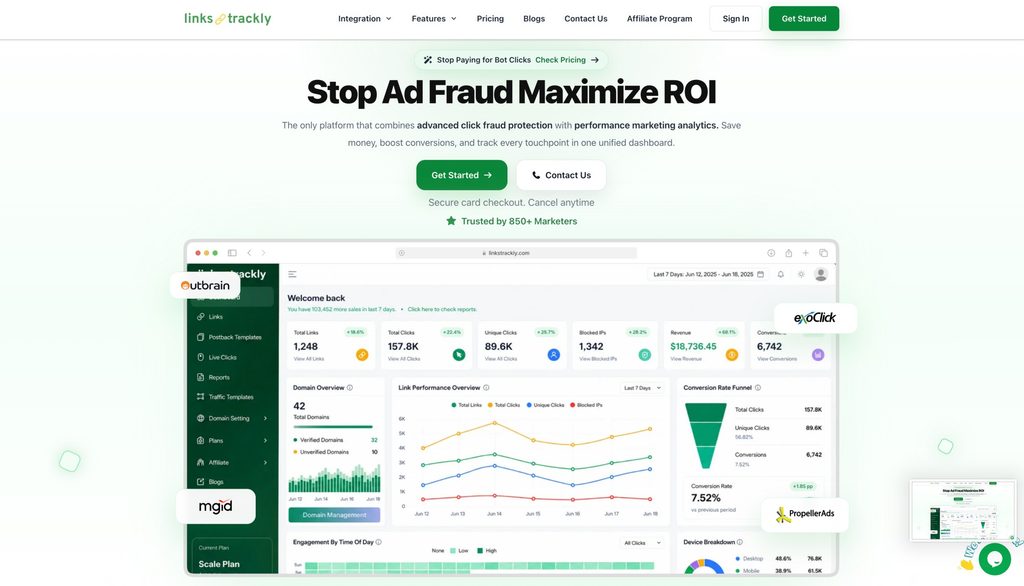
Linkstrackly brings together link tracking, campaign analytics, traffic quality monitoring, and broader advertising-focused capabilities. Its WordPress plugin also supports branded links and redirect management for users who prefer working within WordPress.
This makes it worth evaluating if your workflow involves both link performance and the quality of incoming traffic.
You can start by reviewing the platform’s features at Linkstrackly.com, then compare the available plans, supported integrations, and setup requirements with your actual needs.
How to Choose the Best Link Tracking Software for Your Business
Now that you understand the essential features, how do you turn them into a practical decision?
Start with the problems you want to solve instead of selecting the platform with the longest feature list. A practical way to choose the best link tracking software is to compare each tool against your goals, budget, technical requirements, and expected growth.
Step 1: Define your primary goal
Write down the main reason you need tracking. Is it to monitor affiliate links, measure email campaigns, understand advertising performance, or investigate suspicious traffic?
Your primary goal will help determine which capabilities are essential and which are optional.
Step 2: Identify your must-have features
Separate requirements into three groups:
- Essential: Features you need immediately.
- Useful: Features that could improve your workflow.
- Future requirements: Capabilities you may need as your campaigns grow.
For example, an affiliate blogger might prioritise branded links, destination editing, and click reports. A paid advertising team may need traffic filtering, campaign attribution, conversion events, and advertising integrations.
Step 3: Compare total cost, not just the subscription
Review the subscription price alongside any limits, add-ons, integration expenses, and implementation work.
A low-cost tool may be perfectly suitable for simple tracking. A more advanced platform may offer better value when it replaces several separate workflows. The correct choice depends on how much you will actually use.
Step 4: Test with a real campaign
Before moving all your links, create a small test campaign.
Use a few tracking links, verify the destinations, record the starting data, and trigger a test conversion if your setup supports it. Compare the resulting reports with the source platform.
This is the best way to discover missing parameters, incorrect redirects, duplicate events, and other setup problems before they affect an important campaign.
Step 5: Review the data after launch
Give the campaign enough time to collect useful information. Then compare clicks, traffic sources, conversions, and costs where applicable.
Do not make major decisions from a single unusual day unless there is a clear operational issue that needs immediate attention.
A Simple Comparison Checklist
Use this checklist when reviewing the best link tracking software for your organisation.
| Evaluation criterion | What to verify |
|---|---|
| Click tracking | Total clicks and unique visitor reporting |
| Campaign attribution | UTM parameters, referral sources, and campaign comparisons |
| Conversion tracking | Supported events and integration requirements |
| Analytics | Useful reports, filters, and export options |
| Traffic quality | Suspicious activity analysis and available controls |
| Link management | Branded URLs, editable destinations, and redirect options |
| Visitor context | Device, browser, and geographic information |
| Privacy | Data collection, security, retention, and compliance requirements |
| Scalability | Pricing, usage limits, integrations, and support |
You can use this checklist to compare Linkstrackly with other providers based on your specific requirements, rather than relying on marketing claims alone.
Common Mistakes to Avoid When Using Link Tracking Software
Even a capable tool cannot fix every measurement problem. Avoid these common mistakes to get more value from your setup.
1. Tracking clicks without defining success
Decide whether success means a sale, a qualified lead, a registration, or another meaningful action. Otherwise, you may optimise for clicks that never contribute to your goals.
2. Using inconsistent campaign names
Standardise UTM parameters and campaign labels before launching. Consistency makes reports easier to compare.
3. Assuming every click is genuine
Automated activity, repeated visits, and monitoring systems can affect click counts. Review unusual patterns before drawing conclusions.
4. Forgetting to test redirects
A tracking link that points to the wrong destination can waste traffic and damage the user experience. Test links on mobile and desktop before publishing them.
5. Ignoring conversion configuration
A dashboard cannot accurately report purchases or leads unless the relevant events are configured and received correctly. Test events and check for duplicate firing.
6. Choosing features you will never use
A complex platform may be unnecessary for a small website. Start with your current requirements and pay for additional capabilities when they provide real value.
7. Overlooking privacy obligations
Review what data you collect, how you process it, and what disclosures or consent mechanisms may be required. Tracking should support better decisions without disregarding visitor rights.
Take the Next Step Toward Smarter Link Tracking
You know what to look for in link tracking software. Now, explore a solution that brings link analytics and campaign monitoring together. Visit Linkstrackly to review its available features and plans and find the right fit for your marketing goals.
Conclusion
Choosing a link tracking platform is not simply about finding a tool that counts clicks. It is about understanding which links attract attention, where your visitors come from, how campaigns perform, and whether that activity leads to meaningful results. The best link tracking software is ultimately the one that provides dependable, relevant data and helps you turn campaign activity into informed decisions.
The best link tracking software for your business will depend on your goals, technical setup, budget, and reporting needs. For some users, branded links and basic analytics will be enough. Others will benefit from conversion attribution, detailed reporting, traffic quality analysis, and click fraud protection.
Use the nine features in this guide as your evaluation framework. Test important workflows before committing, compare the reports with your existing analytics, and prioritise information that helps you make better marketing decisions.
If you want to explore a platform that combines link tracking with broader campaign analytics and traffic protection, take a look at Linkstrackly. Review its available features and plans to determine whether they fit your workflow.
The goal is not to collect the most data. It is to collect the right data, understand what it means, and use it to make your next campaign more effective.
FAQs
1. What is the best link tracking software?
The right choice depends on what you need to measure. Compare click accuracy, campaign attribution, conversion tracking, reporting, link management, privacy controls, and pricing. Linkstrackly is one option to evaluate if you want link analytics alongside campaign monitoring and click fraud protection.
2. What features should the best link tracking software have?
Essential features include click tracking, unique visitor reporting, campaign attribution, useful analytics, and flexible link management. Depending on your business, you may also need conversion tracking, suspicious traffic detection, geographic reporting, integrations, and exportable reports.
3. Is link tracking software useful for affiliate marketing?
Yes. It can help affiliate marketers compare promotional placements, monitor clicks, organise destination URLs, and identify which campaigns attract interest. To measure actual affiliate sales, ensure the tracking setup can receive conversion data from the relevant affiliate network.
4. What is the best affiliate link tracking software for beginners?
Beginners should look for an easy interface, branded link creation, straightforward redirect management, and understandable click reports. WordPress users may prefer a plugin that works within their existing website. More advanced affiliate businesses may need postbacks, conversion attribution, traffic filtering, and detailed reporting.
5. Can link tracking software track conversions as well as clicks?
Some platforms can track both, but conversion tracking generally requires additional configuration. You may need website events, tracking tags, API integrations, or server-to-server postbacks. Always test the setup to ensure that conversions are recorded correctly and are not counted multiple times.
6. What is the difference between link tracking and UTM tracking?
Link tracking usually refers to measuring activity associated with a specific URL through a tracking platform. UTM parameters are labels added to a URL to identify campaign information, such as source, medium, and campaign name. They can work together: a tracking link can preserve campaign parameters so analytics systems can identify where traffic originated.
7. Can I track affiliate links on WordPress?
Yes. WordPress users can use link tracking plugins to create branded URLs, manage redirects, and monitor click activity. The available features vary by plugin. Linkstrackly’s WordPress plugin provides link management and click analytics, with additional capabilities depending on the product version.
8. Is free link tracking software good enough?
Free tools can be sufficient for bloggers, small websites, and users with basic tracking needs. However, check for limitations involving click volume, data retention, reporting, integrations, and the number of links you can manage. Paid software may be worthwhile when you need advanced analytics, automation, or traffic protection.
9. How can I identify suspicious clicks using link tracking software?
Look for unusual changes in click volume, repeated activity, unexpected geographic patterns, and discrepancies between clicks and conversions. Compare these signals with your advertising platform’s records. No single signal proves fraud, so use multiple indicators and the provider’s documented detection methods before taking action.
10. Is link tracking software privacy-friendly?
It can be used responsibly, but privacy depends on the information collected, how it is processed, and the applicable legal requirements. Review the provider’s privacy policy, data retention practices, security controls, and consent requirements. Avoid collecting unnecessary data, and do not assume that cookie-free or server-side tracking automatically makes a setup compliant.