

Every dollar you spend on digital marketing should work hard for your business. Sadly, automated traffic often wastes your money without giving you any real value. Protecting your investment is key for long-term success.
Learning how to stop bot clicks on Google Ads is the best way to get your money back. By removing these fake clicks, your ads reach real customers who want to buy.
This guide shows you how to keep your account safe from bad software. By following these steps, you’ll boost your sales and keep your marketing budget growing.
Key Takeaways
- Identify the signs of invalid traffic in your dashboard.
- Understand the financial impact of automated engagement.
- Implement advanced filtering to block suspicious IP addresses.
- Optimize your campaign settings for better audience targeting.
- Monitor your performance metrics to ensure lasting protection.
Understanding the Impact of Bot Traffic on Your PPC Campaigns
Ever wondered why your ad budget disappears fast? It’s a big problem for many business owners. Automated scripts use your money without giving you a chance to make a sale. To reduce bot traffic, you need to know these are smart programs that act like people.

These bots click on ads, load pages, and sometimes fill out forms. They work so fast, they can use up your budget in minutes. Detecting these threats is notoriously difficult because they change IP addresses often. Without special tools, your dashboard might show them as real visitors.
“The greatest threat to digital advertising is not the competition, but the invisible drain of automated fraud that siphons value from every click.”
Knowing how these bots work is the first step to saving your ad spend. When you spot non-human activity, you can protect your bottom line. You can reduce bot traffic by using better monitoring. This way, your budget goes to real people who want what you offer.
How to Identify Suspicious Activity in Your Google Ads Dashboard
To prevent invalid traffic, you need to know how to spot trouble in your dashboard. Your Google Ads account has lots of info that shows if bots are messing with your ads. By checking these metrics often, you can stop big budget losses.
It is truly frustrating to watch your money go to fake clicks. To keep up, look for patterns that don’t match your usual campaign results. These odd patterns often mean your traffic quality is at risk.
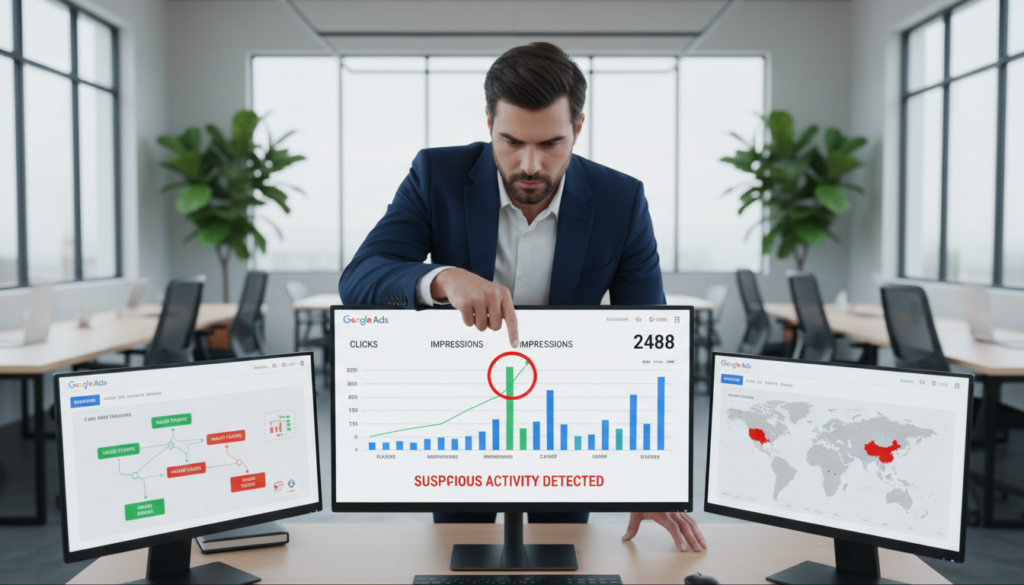
When you look at your reports, watch for these common warning signs:
- Sudden spikes in Click-Through Rate (CTR): A huge, unexpected jump in clicks without more interest.
- High bounce rates: Visitors quickly leave your landing page without doing anything.
- Conversion quality drops: Many clicks but no real leads or sales.
- Unusual traffic sources: Lots of clicks from certain IP addresses or places that don’t fit your audience.
Also, compare your current data with past trends. If your CTR suddenly triples, you’re likely facing bot trouble. Acting fast is key to prevent invalid traffic from hurting your business.
By keeping a close eye on these important signs, you control your ad spending. Early detection is your strongest defense against automated fraud. Regular checks help your budget reach real customers, not fake scripts.
The Financial Consequences of Ignoring Invalid Traffic
Every dollar lost to bots is a dollar you could have used for growth. Ignoring suspicious activity means you’re helping bad actors instead of real customers. To combat click fraud, see it as a serious threat to your profits.
Not watching your campaigns lets bots use up your money fast. Use real-time checks and block certain IP addresses to cut down on waste. Many marketers save 40-50% of their ad budget this way, using it for better channels.
If you don’t fight click fraud, growing your business is hard. You pay for fake clicks that don’t lead to sales. Keeping a close eye on your ads is key for any business owner wanting good returns.
| Metric | Unmanaged Traffic | Protected Traffic |
|---|---|---|
| Budget Efficiency | Low (High Waste) | High (Optimized) |
| Conversion Rate | Artificially Low | Accurate/Higher |
| Ad Spend Savings | 0% | 40-50% |
| Campaign Scalability | Stagnant | High Growth |
Controlling your traffic quality means your ads reach real people. When you combat click fraud, you save your money and make sure each click could be a loyal customer. Start focusing on security to see better results in your reports.
How to stop bot clicks on Google Ads using manual strategies
To stop automated clicks, you must check your traffic sources. Automated tools are useful, but manual checks are key for ad security. By doing this yourself, you learn more about your ads and spot problems that software might miss.
Analyzing IP addresses in your server logs
Your server logs tell you who visits your site. Look for IP addresses that click your ads too much or too fast. You can put these logs into a spreadsheet to find patterns that show a bot is at work.
Watch for these signs of trouble:
- High frequency: One IP address visiting your page many times in an hour.
- Short duration: Sessions that last less than a second, showing it’s not a real person.
- Geographic oddities: Traffic from places where you don’t run ads or offer services.
Setting up basic exclusion lists in Google Ads
After finding bad IP addresses, you can block them in Google Ads. This stops automated clicks and saves your budget. Google Ads lets you block specific IP addresses so your ads don’t show to them.
Here’s how to block them:
- Log in to your Google Ads account and go to the Settings tab.
- Pick the campaign you want to protect from the list.
- Click on Additional settings and find the IP exclusions section.
- Put in the bad IP addresses you found and save your changes.
This work needs to keep going to stay effective. As you get better at stopping bot clicks, you’ll catch new threats before they cost you too much.
Implementing Real-Time Click Threshold Limitations
Setting up real-time click limits can really boost your ad campaign. It helps you save 40-50% on your total ad spend. This way, your money goes to real people, not fake bots.
Defining what constitutes a bot click
To spot bots, look for odd behaviors. They click fast or visit your site too often. These signs mean you should stop automated clicks to save money.
Bots often come from certain places or use old browsers. By knowing these signs, you can block them fast. Precision is key to catch bots without missing real customers.
Configuring frequency caps to prevent budget exhaustion
Frequency caps help protect your budget. They limit how many times one IP can click your ads. This is a key part of bot click prevention today.
Setting these limits is a balance. Start by looking at how real people interact with your ads. Then, set a limit that stops bots but lets real people in. Consistency in monitoring these limits keeps your campaigns doing well.
Leveraging IP Exclusion Lists to Block Fraudulent Traffic
Keeping your marketing money safe is easier with a strong system to block fraudulent clicks. This way, your budget goes to real customers, not fake ones. Studies show using IP lists can save 40-50% on ad spend lost to scams.
Identifying recurring malicious IP ranges
Start by checking your server logs for patterns. Look for IP addresses that click your ads a lot but don’t buy anything. These persistent offenders often come from data centers or proxy networks that waste your money.
After finding these ranges, add them to your Google Ads exclusion list. This stops them from seeing your ads. It’s a highly effective way to save money on useless traffic.
Automating the update process for your exclusion lists
Updating lists by hand can be a big job, as bot networks change their IP addresses often. To keep up, automate finding and blocking threats. Tools that do this for you let you block fraudulent clicks without constant checking.
Automation keeps your lists up-to-date and accurate, giving continuous protection to your ads. By setting up these rules, you can spend more time on creative ideas. Keeping your list clean helps save money and reach more people.
Introducing Linkstrackly.com as Your Primary Defense
Using Linkstrackly.com can change how you defend your ads. Manual checks start, but they can’t keep up with new threats. Linkstrackly.com is your main defense. It’s an automated tool that stops threats before they harm you.
How Linkstrackly.com detects automated behavior
The platform uses smart algorithms to spot fake activity. It checks how users act to find automated bots. This way, your ads budget goes to real people, not bots.
This system learns from new data to fight threats. It catches bad activity fast. This keeps your ads campaign safe and profitable. You won’t have to check logs all day.
Integrating advanced tracking for real-time protection
Adding this tool to your work makes your ads safer. It works with your campaigns to stop fraud all the time. You’ll feel safer knowing your ads are protected by the latest tech.
Here’s why using an automated tool is good for your business:
| Feature | Manual Methods | Linkstrackly.com |
|---|---|---|
| Detection Speed | Delayed/Reactive | Real-time |
| Accuracy | Low/Human Error | High/Automated |
| Maintenance | High Effort | Set and Forget |
| Scalability | Limited | Unlimited |
Using these tools helps you fight fraud better. It also makes your ads more profitable. Using Google ads bot protection with Linkstrackly.com is a smart move for your online marketing.
Step-by-Step Guide to Setting Up Linkstrackly.com
Using the right tools makes Google ads bot protection easy. Follow a simple plan to keep your ads safe from fake traffic. You don’t need to know how to code.
Linkstrackly.com has a simple interface. It helps you protect your ads and keep your budget safe. Your ads will reach real people, not bots.
Connecting your Google Ads account
First, link your ad account to Linkstrackly.com. Go to the integration dashboard. Then, choose to connect your Google Ads account.
Authorization is handled securely through official APIs. Your data stays private. After you give permission, your campaigns sync up. This is key for Google ads bot protection and a good return on investment.
Configuring custom rules for traffic filtering
Once connected, set up rules to block bad traffic. You can filter by click frequency, location, or device type.
Custom rules help you protect your ads. You can block traffic from data centers or suspicious IP addresses. This keeps your ads safe and your budget in check. It lets real customers find your business easily.
Advanced Techniques for Combating Sophisticated Click Fraud
Modern botnets are getting smarter at hiding from filters. They use tricks to combat click fraud and look like real visitors. Basic IP blocking isn’t enough to stop these threats.
Detecting headless browsers and proxy networks
Attackers use headless browsers to act like real users. These tools work like a person but don’t show a browser window. They can do a lot without using much computer power.
These bots also use complex proxy networks to change IP addresses often. This makes it hard to catch them with simple blacklists. Look for odd browser fingerprints and header info to spot them.
Using behavioral analysis to distinguish humans from bots
Good bot click prevention knows how humans act online. Humans move their mouse and scroll differently than bots. Bots click in straight lines and don’t pause.
Behavioral analysis tracks these small differences in real-time. If someone moves too smoothly or clicks too fast, it’s likely a bot. This method checks the intent behind the action, not just where it comes from.
Learning these advanced methods is key to success. Keeping your budget safe from fraud is important. Always update your security to stay one step ahead.
Monitoring and Optimizing Your Protection Strategy
Keeping your ads safe is an ongoing task. Digital threats change all the time. So, your defenses must keep up to outsmart bad guys.
By always checking your setup, you keep your money safe from smart attacks.
Reviewing performance reports after implementation
After setting up your security tools, check your reports often. Look for good signs like better click-through rates and more conversions. A drop in bounce rates means you’re blocking bad traffic well.
Compare your new numbers to old ones to see how your protection is helping. Watching these reports closely helps you catch problems early.
Adjusting thresholds based on campaign data
Your security settings should change over time. Too strict rules can block good users. So, check your settings often to keep real users coming in.
Track important numbers to keep your ads safe and running well:
| Metric | Goal | Action Required |
|---|---|---|
| Click-Through Rate | Stable/Healthy | Monitor for sudden spikes |
| Conversion Rate | Consistent Growth | Adjust thresholds if dropping |
| Invalid Click Ratio | Minimal | Tighten rules if increasing |
| Cost Per Acquisition | Target Range | Optimize filters for efficiency |
Use this data to make your filters better. Being flexible is key against automated threats. Stay ahead by always checking your results. Your ads will stay safe and profitable.
Common Pitfalls to Avoid When Blocking Traffic
Protecting your budget is key, but don’t overdo it. When trying to block fraudulent clicks, don’t get too strict. A too-tight strategy might scare away the people you want to reach.
Avoiding the accidental blocking of legitimate customers
Marketers often set too low thresholds. If you call a “bot” after just one click, you might block real users. False positives are a big problem without human checks.
Real people don’t always act like they’re supposed to. They might click, then leave and come back. This can look bad to a wrong filter. Make sure to regularly audit your exclusion lists to avoid blocking good traffic.
“Precision is the difference between a successful campaign and a missed opportunity; always measure twice before you cut.”
Balancing strict security with campaign reach
Keeping a good flow of traffic needs a smart security plan. Instead of banning everything, use a tiered system. This way, you can watch out for trouble without blocking everything.
Think of your security as part of your campaign. Change your settings based on how things are doing now, not just guesses. This way, you can block fraudulent clicks and keep your business growing.
Conclusion
Starting a more profitable marketing strategy means controlling your traffic quality. Saving money from fake clicks helps your business grow. By stopping ad fraud, you can focus on real customers who want to buy from you.
Linkstrackly.com helps keep your ads clean and effective. You’ll know your money is spent on real people. This way, your ads help your business grow reliably.
Make your online space cleaner today. Stopping ad fraud keeps your numbers right and your plan strong. Check your traffic now and use these steps to protect it. Your brand should shine in the online world.